Contacts: focused dialer and call-history app with after-call widgets
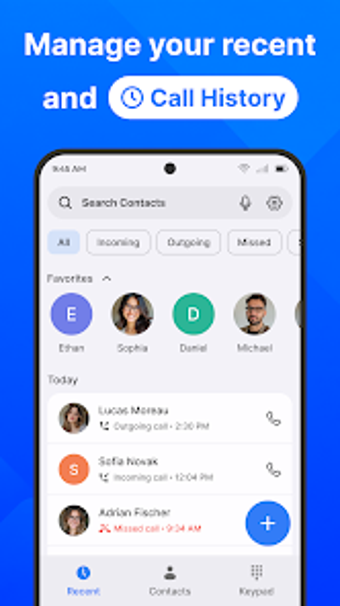
Contacts Call History, developed by manage your file, replaces the default Android dialer with a contact and call-management tool aimed at personal and small-business use, with straightforward contact editing. It provides a smart T9 keypad for fast number entry, detailed call logs with timestamps, favorite contacts, and after-call widgets for quick follow-up actions. Theme customization and dark mode let users personalize appearance, while dual SIM support and local-only data handling appeal to people who prioritize privacy and device-level control.

Unlock your creativity with Adobe Stock
Get 10 images or 1 video with a free trial
How the app handles everyday dialing and contact lookup
The app centers on a smart T9 dialer to make contact search and number entry faster. Core tools include a favorites section for one-tap calls and a structured call history that records incoming, outgoing, and missed calls with timestamps. A concise list highlights the main utilities users rely on:
- Smart T9 keypad for quick searches
- Favorite contacts for rapid access
- Detailed call logs with timestamps
How private your contact data remains
Privacy is explicit in the developer statement: the app declares it does not collect user data or share information with third parties, and stores information locally on the device. That approach suits people who prefer device-level control of contacts and call history, since data handling is described as local-only rather than cloud-first. The declaration gives a clear basis for privacy-minded use.
How after-call tools shape follow-up work
After-call productivity widgets appear immediately after a call ends and let users act without deep menu navigation. Examples of quick actions given by the developer include saving a new number, sending a follow-up message, or setting a reminder. These widgets reduce taps between a call and common next steps, which supports users who handle frequent short calls or need rapid note-taking after conversations.
How the app fits multi-SIM and device-focused workflows
The app is Android-only and explicitly supports dual SIM and multi-SIM setups, showing clear SIM card identification when calls are placed. Compatibility notes indicate it runs on modern Android releases, typically Android 5.0 and up. That focus places the tool firmly in single-device workflows where SIM management and local contact control matter more than cross-device synchronization.
Contacts is a practical, device-focused option for privacy-conscious callers
Contacts is a pragmatic option for Android users who need efficient on-device contact management and rapid post-call actions. Its local-only data handling suits people who avoid third-party data sharing, and dual SIM clarity supports multi-number use on one device. A limitation to consider is that the tool is confined to Android devices, so it is less suited to users who need native cross-device or desktop clients.